Automated data entry uses AI to capture and process information, reducing errors and saving time. It improves efficiency, ensures data security, supports compliance, and enables smarter business decisions. Even small implementations can transform workflows and free employees for strategic work.
Manual data entry is eating up your team’s valuable time. Between typing invoices, updating customer records, and transferring information between systems, businesses lose countless hours to repetitive tasks that technology could handle instantly.
Automated data entry transforms how organizations manage information by eliminating manual input, reducing errors, and freeing employees to focus on strategic work. This technology captures data from various sources—documents, forms, emails—and automatically populates databases, spreadsheets, and business applications.
This guide explores how automated data entry works, its security benefits, and practical steps to implement these solutions in your organization. You’ll discover why secure storage matters and how to choose the right system for your needs.
What is Automated Data Entry?
Automated data entry uses software and artificial intelligence to capture, process, and store information without human intervention. Instead of employees manually typing data from paper forms or digital documents, specialized tools extract this information automatically and place it in the correct database fields.
The technology combines optical character recognition (OCR), machine learning, and intelligent document processing to read various data formats. Whether you’re dealing with handwritten forms, printed invoices, or digital receipts, automated systems can interpret and organize this information accurately.
Modern automated data entry solutions handle structured data (like forms with specific fields) and unstructured data (such as emails or free-text documents). This versatility makes the technology valuable across industries, from healthcare and finance to retail and manufacturing.
How Automated Data Entry Systems Work
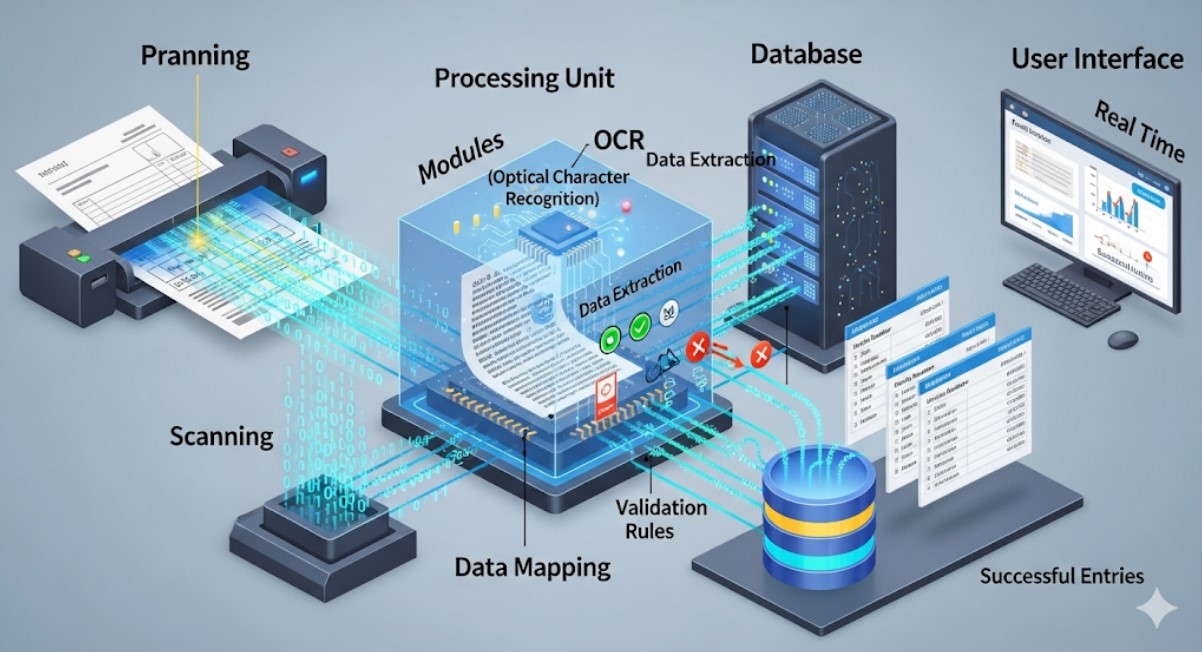
The process begins when documents enter the system through various channels—email attachments, scanned papers, web forms, or direct file uploads. The software immediately begins analyzing these materials using advanced recognition technologies. Learn more in our cross-platform data entry automation guide.
OCR technology converts images of text into machine-readable characters. This step allows the system to “read” printed or handwritten content from physical documents. Machine learning algorithms then interpret this text, identifying specific data points like names, addresses, dates, and monetary amounts.
Natural language processing helps the system understand context and meaning. For example, it can distinguish between a billing address and shipping address within the same document, ensuring data lands in the correct database fields.
The extracted information undergoes validation checks against predefined rules and existing database records. If the system detects inconsistencies or missing information, it flags these items for human review. Clean, validated data then flows automatically into your chosen storage systems.
Security Benefits of Automated Data Entry
Traditional manual data entry creates numerous security vulnerabilities. Employees handle sensitive documents at their desks, papers sit in processing queues, and information passes through multiple hands before reaching secure storage. Each touchpoint introduces potential risks. Our data entry automation with OCR and AI article explains how automation mitigates these risks.
Automated systems minimize human contact with sensitive data. Documents move directly from capture to secure digital storage, reducing exposure time and limiting access to authorized systems only. This streamlined path significantly decreases chances of data breaches or unauthorized access.
Digital audit trails provide complete visibility into data handling processes. Every document processed, user access attempt, and system action gets logged with timestamps and user identification. This comprehensive tracking helps organizations meet compliance requirements and quickly identify any security incidents.
Role-based access controls ensure only authorized personnel can view or modify specific data types. Unlike physical documents that anyone can potentially see, automated systems enforce strict permissions at the data field level.
Secure Storage Solutions for Automated Data

Cloud-based storage platforms offer robust security features specifically designed for sensitive business data. These solutions include encryption both at rest and in transit, ensuring your information remains protected whether stored on servers or moving between systems. For implementation insights, check out automated data entry in Xero.
Enterprise-grade cloud storage providers implement multiple layers of security protection. They use advanced firewalls, intrusion detection systems, and regular security audits to maintain the highest protection standards. Many platforms achieve SOC 2, HIPAA, and other compliance certifications required by regulated industries.
Backup and disaster recovery capabilities protect against data loss from system failures, natural disasters, or cyber attacks. Automated backup processes create multiple copies of your data across geographically distributed servers, ensuring business continuity even during major disruptions.
On-premises storage solutions provide complete control over data location and access protocols. Organizations with strict data sovereignty requirements or highly sensitive information often prefer keeping automated data entry systems within their own infrastructure.
Hybrid approaches combine cloud flexibility with on-premises control. Sensitive data remains in local systems while less critical information leverages cloud-based processing and storage capabilities.
Implementation Best Practices
Start with a comprehensive data audit to understand what types of information your organization processes regularly. Identify high-volume, repetitive data entry tasks that consume significant employee time. These represent the best opportunities for automation impact. Businesses integrating multiple technologies may also benefit from AR in email marketing campaigns to enhance engagement while automating internal processes.
Choose software solutions that integrate seamlessly with your existing business systems. The best automated data entry tools connect directly to your customer relationship management (CRM) software, enterprise resource planning (ERP) systems, and accounting platforms.
Establish clear data governance policies before implementation. Define who can access different data types, how long information should be retained, and what approval processes apply to sensitive records. These policies ensure consistent, compliant data handling from day one.
Train your team on new automated workflows and security protocols. Employees need to understand their roles in the automated process, from document submission procedures to exception handling responsibilities.
Automated Data Entry as a Foundation for Business Intelligence
Automated data entry does more than save time—it fundamentally improves the quality and usability of business data. When information is captured consistently and accurately at scale, it becomes far more valuable for analytics, forecasting, and decision-making. Manual data entry often introduces inconsistencies such as formatting variations, missing fields, or delayed updates, which undermine the reliability of reports and dashboards.
Automation ensures data is standardized at the point of entry. Fields are populated according to predefined rules, timestamps are recorded automatically, and duplicate entries are minimized. This creates cleaner datasets that can be analyzed with confidence. Over time, organizations gain the ability to spot trends earlier, measure performance more accurately, and respond faster to operational issues.
For leadership teams, this means moving from reactive reporting to proactive strategy. When data flows into analytics tools in near real time, businesses can monitor cash flow, inventory levels, customer behavior, and operational efficiency without waiting for manual updates. Automated data entry becomes the invisible infrastructure that supports smarter, faster decisions across the organization.
Compliance and Regulatory Readiness Through Automation
For many industries, data entry is tightly linked to regulatory compliance. Healthcare organizations must protect patient records, financial institutions must meet strict audit requirements, and enterprises handling personal data must comply with privacy regulations such as GDPR or similar frameworks.
Automated data entry systems support compliance by enforcing rules consistently. Required fields cannot be skipped, data formats remain standardized, and access controls are applied automatically. This reduces the risk of non-compliance caused by human oversight or inconsistent manual processes.
Additionally, automated systems simplify audits and regulatory reviews. Digital records are easier to retrieve, trace, and verify than paper-based or manually entered data. Audit logs provide clear evidence of when data was captured, who accessed it, and what changes were made. This level of transparency not only reduces compliance risk but also lowers the cost and stress associated with audits.
Change Management and Employee Adoption

One of the most underestimated aspects of implementing automated data entry is change management. While automation reduces repetitive work, employees may initially worry about job security or feel uncertain about new workflows. Addressing these concerns proactively is essential for successful adoption.
Clear communication helps teams understand that automation is designed to support their work, not replace their expertise. When employees see that tedious data entry tasks are removed from their daily routines, they can focus on higher-value activities such as analysis, customer interaction, and problem-solving.
Training plays a critical role in adoption. Employees should understand how automated systems work, how to handle exceptions, and how to verify outputs when needed. When teams feel confident using the technology, automation becomes a productivity enhancer rather than a disruption. Over time, organizations often find that employee morale improves as work becomes more meaningful and less repetitive.
Handling Data Exceptions Without Slowing Operations
No data entry system operates in a perfect environment. Unclear handwriting, missing fields, or unusual document formats will always occur. The difference between manual and automated processes lies in how these exceptions are handled.
Modern automated data entry systems are designed to identify anomalies instantly and route them for targeted human review. Instead of slowing down the entire workflow, only problematic records are flagged, while clean data continues processing uninterrupted. This selective intervention model preserves efficiency while maintaining high data quality, allowing organizations to scale operations without sacrificing accuracy or control.
Measuring Success and ROI
Track time savings by comparing manual processing speeds with automated throughput. Most organizations see 70-80% reduction in data entry time after implementing automated solutions. Calculate the monetary value of this saved time by multiplying hours saved by average hourly wages.
Monitor error rates before and after automation implementation. Manual data entry typically produces 1-3% error rates, while automated systems achieve accuracy levels above 95%. Fewer errors mean less time spent on corrections and reduced risks from incorrect information.
Measure employee satisfaction improvements as team members shift from repetitive data entry to more engaging, strategic work. This qualitative benefit often translates into better retention rates and increased productivity across other business areas.
Choosing the Right Automated Data Entry Solution
Evaluate solutions based on your specific document types and data complexity. Simple form-based automation requires different capabilities than complex invoice processing or contract analysis. Request demonstrations using your actual documents to assess accuracy and processing speed.
Consider scalability requirements for future growth. Choose platforms that can handle increasing document volumes and additional data types without requiring complete system replacements.
Security certifications and compliance capabilities should match your industry requirements. Financial services organizations need different security standards than retail businesses or healthcare providers.
Integration capabilities determine how smoothly new automated systems work with existing business tools. Look for solutions offering pre-built connectors to your current software stack.
Transforming Your Data Management Strategy

Automated data entry with secure storage represents a fundamental shift toward more efficient, accurate business operations. Organizations implementing these solutions typically see immediate improvements in processing speed, data quality, and employee satisfaction.
The technology continues evolving rapidly, with artificial intelligence and machine learning capabilities becoming more sophisticated each year. Early adopters gain competitive advantages through improved operational efficiency and better data-driven decision making.
Start your automation journey by identifying one high-volume data entry process for pilot implementation. Success with a single use case builds organizational confidence and provides concrete ROI data for expanding automation across other business functions.
Modern business success depends on efficient information management. Automated data entry provides the foundation for this efficiency while ensuring your valuable data remains secure and accessible when needed.
Frequently Asked Questions (FAQ)
Is automated data entry suitable for small businesses?
Yes, automated data entry is highly beneficial for small businesses, especially those with limited staff handling administrative tasks. Automation allows small teams to operate more efficiently, reduce errors, and scale operations without significantly increasing headcount.
How accurate is automated data entry compared to manual entry?
Modern automated data entry systems typically achieve accuracy rates above 95%, and often higher when combined with validation rules and machine learning. Manual data entry, by contrast, is more prone to fatigue-related errors and inconsistencies.
What types of documents work best with automated data entry?
Invoices, receipts, application forms, purchase orders, and customer records are among the most common and effective use cases. Advances in AI now allow systems to handle semi-structured and unstructured documents such as emails and contracts as well.
Does automated data entry eliminate the need for human review?
In most cases, automation significantly reduces but does not completely eliminate human involvement. Exception handling and quality checks are still important for unusual cases or critical data. Over time, systems learn from corrections and require less oversight.
How long does implementation typically take?
Implementation timelines vary based on document complexity and system integration requirements. Simple workflows can be automated in a few weeks, while enterprise-scale deployments may take several months to fully optimize.
Is automated data entry secure enough for sensitive information?
When implemented correctly, automated data entry systems are often more secure than manual processes. Encryption, access controls, audit logs, and compliance certifications provide stronger protection than paper-based or email-driven workflows.